Lattice Construction#
Constructing a Lattice#
A Lattice contains a set of branches. The component of Lattice is:
branches # [List] List of branches.
Each branch is instantiated from a BeamLine that is called the root BeamLine.
Example:
- my_lattice:
    kind: Lattice
    branches:
      - this_line    # this_line is the root beamline for the branch.
      - that_line:
          inherit: that_ring    # Inherit from that_ring BeamLine
          periodic: true
In this example, this_line and that_line are the names of the root BeamLines
for the two Branches that will be created when the lattice is expanded.
Branches created due to Fork elements also have root BeamLines. Branches specified
in the Lattice structure are called root branches of the lattice. Non-root branches
are those branches created due to Fork elements.
A branch has the optional components
inherit   # [String] Optional. Name of the root BeamLine for the branch. Default is the name of the Branch.
periodic  # [Boolean] Optional. Are orbit and Twiss parameters periodic?
          #   Default is the setting of the root BeamLine.
The setting of periodic for a Branch overrides the setting of periodic
set in the root BeamLine. See BeamLine components for documentation of periodic.
Branch Expansion#
Branch expansion is the process, starting from the root BeamLine
of a branch, of constructing the ordered list of lattice elements contained in that branch.
The first lattice element of any root BeamLine line must be a Beginning element and the expanded
branch line may only contain this one Beginning element. If a subline contains a Beginning
element, this element must be dropped from the branch line.
The last lattice element of a branch line must be a Marker element.
Notes:
When a lattice is expanded, in any region of a
Branchwhere the elements are not directionally reversed, the elements must be ordered such that the longitudinal positions at the upstream end of the elements is ordered in increasing \(s\)-position value. For a region where the elements are directionally reversed, the downstream end of the elements must be ordered in increasing \(s\)-position. This mandate on element ordering ensures that the order of elements in a directionally reversedBeamLineis always the reverse of the order of elements in the non-reversedBeamLine.
Lattice Expansion#
Lattice expansion is the process, starting from a Lattice structure instance, where:
The
root BeamLinesof the branches are expanded.Forkelements contained in the root branches are used to construct new branches and, if these new branches haveForkelements, this process is repeated until no new branches need to be created.The floor position along with the reference energy, species and time, of the lattice elements, is computed.
Mathematical expressions are evaluated.
Notes:
All branches must have unique names. However, different branches may use the same root
BeamLine.As detailed in Forking, some
Forkelements may connect to an existing branch. TheseForkelements will not trigger new branch creation.The PALS standard does not mandate how branches should be stored in memory after expansion. For example, branches could be stored using an array or a tree. In any case, the root branches must be marked as such.
The order in which new branches are added to the lattice due to the presence of
Forkelements is not mandated by PALS. This can lead to the situation where connecting aForkelement to what is designated as an existing branch is not possible since the branch being forked to does not yet exist since theForkelement that instantiates this branch has not been processed yet. In this case, the firstForkelement must be temporarily ignored until the branch is instantiated.
Forking#
A Fork element marks a point in a lattice branch where another branch branches off from.
A common example is using a Fork element to connect from a storage ring to
an extraction line or an X-ray beam line. Similarly, a Fork can be used to connect
from the end of an injection line to some place in a ring.
Beam travel is always from the Fork element to another point in the machine.
Using Fork elements, complex machine layouts may be constructed.
An example is shown in figure Fig. 14. See the ForkP documentation
for more details.
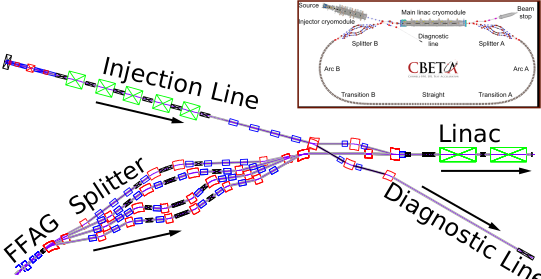
Fig. 14 Example of how Fork and Patch elements can be used to describe even complicated machine geometries.
In the upper right hand corner is shown the Cornell/Brookhaven CBETA machine.
This machine includes an Energy Recovery Linac (ERL) with
8-pass (4 passes with increasing energy and 4 passes with decreasing energy) along with
an injection line, a diagnostic line, and a beam stop line.
The ERL part of the machine includes the Linac, a Fixed Focusing Alternating
Gradient (FFAG) arc, and splitter sections.#
Shown in the main body of the figure is a blowup of the region where the injection line connects
to the Linac along with the diagnostic line and the end of the FFAG arc.
The injection line and the ERL was modeled as a single lattice branch which contained all 8 passes.
Fork elements were used to connect the injection line to the diagnostic line and ERL to the
beam stop line.
The geometry of the splitter sections, used to correct the timings of the beams with
differing energies, is done using Patch elements.
The branch containing a forking element is called the
“source” branch. The branch that the forking element points to is called the
“destination” branch. It is possible for these two branches to be one and the same.
The element in the destination branch that the Fork connects to is called the “destination” element.
Fork elements are uni-directional. That is, particles can travel from a Fork element
to the destination element but travel cannot happen in
the reverse direction. To get a bi-directional link, use two Fork elements with
the destination element of both Forks being the other Fork.
To avoid ambiguities, a Fork element has zero length and unit transfer map and
the kinds of destination element are restricted to be one of:
MarkerBeginningFloorPositionFork
Notice that these kinds of elements have zero length and unit transfer maps.
Example Fork element:
- to_dump:
    kind: Fork
    ForkP:
      to_line: dump_beamline
      destination_element: dump_beginning
      new_branch: proton_dump
      propagate_reference: true
In this example, a Fork element connects to a new branch that will be instantiated using
a BeamLine called dump_beamline. In the expanded lattice, the destination branch will be called
proton_dump. The reference properties at the dump_beginning element that is forked to,
assuming this is the BeginningEle element at the beginning of the branch, will be
the reference properties at the Fork element.
Use statement#
Multiple Lattices can be defined in a lattice file. By default, the one that gets instantiated
is the last lattice. This default can be overridden by a use statement. Example:
- lat1:
    kind: Lattice
    branches:
      ...

- lat2:
    kind: Lattice
    branches:
      ...

- use: lat1