Lattice Element Parameter Groups#
The following details the different lattice element parameter groups. See the Element Parameters section for documentation on element parameters in general.
ACKickerP: AC-Kicker Parameters#
In Construction…
ApertureP: Aperture Parameters#
The ApertureP parameter group contains parameters for describing an aperture.
The components of this group and their defaults are:
ApertureP:
  x_min: null                      # [m] Left aperture limit.
  x_max: null                      # [m] Right aperture limit.
  x_center: null                   # [m] Center of horizontal aperture.
  x_width: null                    # [m] Horizontal aperture full width.
  y_min: null                      # [m] Bottom aperture limit.
  y_max: null                      # [m] Top aperture limit.
  y_center: null                   # [m] Center of vertical aperture
  y_width: null                    # [m] Vertical aperture full width.
  shape: ELLIPTICAL                # [enum] Aperture shape switch
  location: ENTRANCE_END           # [enum] Aperture location switch
  vertices: []                     # [array] Array of vertex points. See below.
  material: ""                     # [string] Material of the Aperture
  thickness: 0                     # [m] Real number
  aperture_shifts_with_body: false # [Boolean] See below.
  aperture_active: true            # [Boolean] false implies aperture is not operating.
The horizontal aperture may be specified by setting x_min and x_max or by setting
x_center and x_width but only one pair may be set. A Similar situation applies to
the vertical aperture. The conversion between the two is
  x_min = x_center - x_width/2,
  x_max = x_center + x_width/2
  y_min = y_center - y_width/2,
  y_max = y_center + y_width/2
If there is only an aperture on one side, the min or max must be set as it does not make sense to set center and width in this case.
Location component#
The aperture location is set by the location parameter. Possible values are
  location: ENTRANCE_END   # Body entrance end (default)
  location: CENTER         # Element center
  location: EXIT_END       # Body exit end
  location: BOTH_ENDS      # Both ends
  location: NOWHERE        # No location
  location: EVERYWHERE     # Everywhere
The default is ENTRANCE_END.
Shape component#
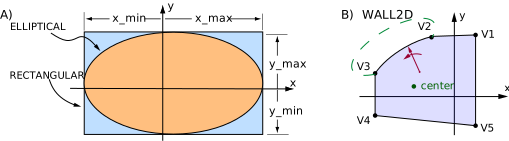
Fig. 8 A) RECTANGULAR and ELLIPTICAL apertures. As drawn, x_min and y_min are
negative and x_max and y_max are positive. B) The vertices aperture is defined
by a set of vertices.#
The shape parameter selects the shape of the aperture. Possible values are:
  shape: RECTANGULAR   # Rectangular shape.
  shape: ELLIPTICAL    # Elliptical shape. Default.
  shape: VERTICES      # Shape defined by set of vertices.
  shape: CUSTOM_SHAPE  # Shape defined outside of the PALS standard.
Limit components#
For RECTANGULAR and ELLIPTICAL shapes the limit parameters are
used to calculate the aperture as shown in Fig. 8A.
For an ELLIPTICAL aperture, all four limits must be set otherwise the aperture is not active.
A particle with position \((x, y)\) is outside of the aperture if:
  ((x - x0) / xw)^2 + ((y - y0) / yw)^2 > 1
where
  x0 = (x_max - x_min) / 2
  y0 = (y_max - y_min) / 2
  xw = (x_max - x_min) / 2
  yw = (y_max + y_min) / 2
For a RECTANGULAR aperture, a particle is outside of the aperture if any of the following
four conditions is true:
  1) x < x_min && x_min != null
  2) x > x_max && x_max != null
  3) y < y_min && y_min != null
  4) y > y_max && y_max != null
If center and width are specified, the equivalent min and max are calculated to be used in the above inequalities.
aperture_shifts_with_body#
The aperture_shifts_with_body parameter determines whether misaligning an element
affects the placement of the aperture. The default is False.
A common case where aperture_shifts_with_body would be False is when a beam pipe,
which incorporates the aperture, is not physically touching the surrounding magnet element.
When tracking a particle, assuming that there are only apertures at the element ends,
the order of computation with aperture_shifts_with_body set to False could be
  1) Start at upstream end of element
  2) Check upstream aperture if there is one.
  3) Convert from branch coordinates to body coordinates.
  4) Track through the element body.
  5) Convert from body coordinates to branch coordinates.
  6) Check downstream aperture if there is one.
  7) End at downstream end of element.
With aperture_shifts_with_body set to true, the computation order could be
  1) Start at upstream end of element
  2) Convert from branch coordinates to body coordinates.
  3) Check upstream aperture if there is one.
  4) Track through the element body.
  5) Check downstream aperture if there is one.
  6) Convert from body coordinates to branch coordinates.
  7) End at downstream end of element.
The difference between the two lists is simply that lines 2 and 3 are switched along with lines 5 and 6.
material#
The material parameter sets the material of the aperture.
Using chemical formulas like Cu and Fe is the most portable.
vertices component#
The VERTICES setting for shape is for defining an aperture using a
set of vertex points as illustrated in Fig. 8B.
Between vertex points, the aperture can follow a straight line or the arc of an ellipse.
The vertex points are specified by setting the vertices parameter. This parameter has three
subcomponents
  verticies:
    center: 0                 # [m] Vector of (x, y) center point.
    absolute_vertices: false  # [Boolean] Default is False.
    list: [{}]                # [List of dictionaries] Ordered list of vertex points.
The list vector can have the components:
point       # [m] Vector of two real numbers.
radius      # [m] Vector of single or two real numbers.
tilt        # [rad/2pi] Ellipse tilt angle.
Example:
ApertureP:
  vertices:
    center: [-0.045, 0.011]
    absolute_vertices: true
    list:
      - point: [0.023, 0.069]      # V1
      - point: [-0.025, 0.067]     # V2
      - radius: [0.08, 0.04]
      - tilt: 0.12
      - point: [-0.088, 0.036]     # V3
      - point: [-0.088, -0.021]    # V4
      - point: [0.023, -0.033]     # V5
This corresponds roughly to what is shown in Fig. 8.
If the boolean absolute_vertices is set False, which is the default,
the vertex point positions are with respect to the center point.
That is, the vertex point positions in absolute terms are the positions given with each vertex plus
the position of the center. If absolute_vertices is true, the vertex point positions
are independent of the center point. The default position of the center is the origin.
The list component of vertices contains an ordered list of vertex
points with each one specifying an \((x, y)\) position.
In between any two points, there can optionally be a single radius element.
If there is a radius element, there can also be a single tilt element between
the points but tilt can only be present if there is a radius present.
There can also be a radius element and tilt element after the last point in the list.
If these are present, they are considered to be between the last and first points in the list.
The aperture is constructed by connecting consecutive points in the list along with
connecting the last point to the first. If there is no radius between consecutive points,
the aperture follows a straight line between the points. If there is a radius element between
two points, the aperture is either a circular arc or a section of an ellipse.
A radius can have either a single value or a list of two values. If a radius has a single
value, this is the radius of the circular arc connecting the vertices. In this case, the tilt
element may not be present. If the radius has two values, these are the half lengths of the
principal diameters. If the tilt is zero (the default), the ellipse is upright with the first
radius value being the \(x\)-axis half width and the second value being the \(y\)-axis
half width. A non-zero tilt value rotates the ellipse by that amount.
In order to be able to quickly calculate whether a particle is inside or outside the
aperture, the aperture shape has some restrictions. For one,
the vertex points must be arranged so that the polar coordinate angle of the vertex points
with respect to the center point is increasing. That is, for vertices \(v_i\) and
\(v_{i+1}\) that are at angles \(\theta_i\) and \(\theta_{i+1}\) with respect
to the center point:
Another restriction is that any half-line drawn from the center point out to infinity intersects
the aperture at exactly one point. Finally, for a circular or elliptical arc, of
the four possible solutions that connect the two vertex points at the ends of the arc,
the arc used is the arc of minimal length such that the center of the ellipse is on the same side
as the center point with respect to a line drawn through the two points.
When using vertices, an efficient way to determine if a point \((x, y)\) is within the aperture
is the following. Note: The computation is with respect to the center point.
  0) Determine the polar coordinate angles {math}`\theta_i` of the vertices. These angles can be
stored so this computation only has to be done once.
  1) Determine the angle of the particle.
  2) A simple binary search will give the neighboring pair of vertices the particle's angle falls between.
  3) A simple geometric calculation now determines where the half line drawn from the `center`
and through the particle point intersects the aperture.
  4) The particle is outside the aperture if and only if the intersection point is between the
particle point and the `center` point.
BeamBeamP: BeamBeam Parameters#
The BeamBeamP parameter group describes a particle beam element
from the opposite moving colliding beam.
Without explicit input specification, the hourglass effect is turned off.
The inputs of BeamBeamP are:
BeamBeamP:
  sigma_x: null   # [m] The horizontal beam size of the opposite beam.
  sigma_y: null   # [m] The vertical beam size of the opposite beam.
  sigma_z: null   # [m] The longitudinal beam size of the opposite beam.
  alpha_x: null   # [unitless] The horizontal Twiss parameter alpha at interaction point.
  beta_x:  null   # [m] The horizontal Twiss parameter beta at interaction point.
  alpha_y: null   # [unitless] The vertical Twiss parameter alpha at interaction point.
  beta_y: null    # [m] The vertical Twiss parameter beta at interaction point.
  charge: null    # [unitless] The charge of the opposite beam.
  energy: null    # [eV] The total energy in eV of the opposite beam.
  N_particle: null  # [unitless] Number of particles in the opposite beam.
BendP: Bend Parameters#
The BendP group stores the parameters that characterize the shape of a Bend element.
The only relevant shape parameter that is not in the BendP is the
length length parameter.
BendP:
  angle_ref: 0             # [radian] Reference bend angle
  bend_field_ref: 0        # [T] Reference bend field
  bend_field_actual:       # [T] Output param. Actual bend field perpendicular to the reference plane.
  e1: 0                    # [radian] Entrance end pole face rotation with respect to a sector geometry
  e2: 0                    # [radian] Exit end pole face rotation with respect to a sector geometry
  e1_rect: 0               # [radian] Entrance end pole face rotation with respect to a rectangular geometry
  e2_rect: 0               # [radian] Exit end pole face rotation with respect to a rectangular geometry
  edge1_int: 0             # [T*m] Entrance end fringe field integral
  edge2_int: 0             # [T*m] Exit end fringe field integral
  g_ref: 0                 # [1/m] Reference bend strength = 1/radius_ref
  g_actual:                 # [1/m] Output param. Actual bending strength corresponding to `bend_field_actual`.
  multipole_type: vertically_pure # [enum] Only relavent if `ref_coords` is set to `arc`.
  h1: 0                    # [1/m] Entrance end pole face curvature
  h2: 0                    # [1/m] Exit end pole face curvature
  L_chord: 0               # [m] Chord length.
  L_sagitta: 0             # [m] Sagitta length. Output parameter.
  L_rectangle: 0           # [m] Rectangular length.
  ref_coords: arc          # [enum] Reference coordinates type.
  rho_ref: null            # [m]s Reference bend radius.
  tilt_ref: 0              # [radian] Reference tilt
The geometry of a bend in body. coordinates is shown in Fig. 9.
In body coordinates the rotation axis is, by definition, always the \(y\)-axis.
Note that in general the rotation axis in branch coordinates will not be the \(y\)-axis.
An exception to this is if tilt_ref is zero for all bends so that the
machine lies in the “horizontal” plane.
Note: In the equations below, \(q\) is the charge of the reference particle and \(p_0\) is the reference momentum.
Note: The attributes g_ref, angle_ref, rho_ref and length are mutually dependent. Specifying
more than two of these can be contradictory.
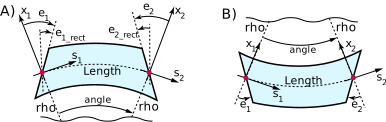
Fig. 9 Bend geometry in body coordinates. The red curve is the reference curve. Red dots mark the entry \((z_1, x_1)\) and exit \((z_2, x_2)\) coordinate points. The rotation axis is parallel to the (out of the page) \(y\)-axis.#
A) Bend geometry for ref_coords set to arc or chord. For the geometry shown,
g_ref, angle_ref, rho_ref, e1, e2, e1_rect, and e2_rect are all positive.
B) Same as (A) but with a negative bend angle. For the geometry shown,
g_ref, angle_ref, rho_ref, e1, e2, e1_rect, and e2_rect are all negative.
C) Bend geometry for ref_coords set to entrance_coords.
D) Bend geometry for ref_coords set to exit_coords.
In detail:
angle_ref
The total Reference bend angle. A positive
angle_refrepresents a bend towards negative \(x\) as shown in Fig. 9.angle_ref = length * g_ref.
bend_field_ref
The
bend_field_refparameter is the reference magnetic bending field which is the field that is needed for the reference particle to be bent in a circle of radiusrho_ref. The direction of the reference bend field along the \(y\)-axis.(14)#\[\text{bend\_field\_ref} = \frac{p_0}{q} \cdot \text{g\_ref}\]Also see
g_ref,g_actual, andbend_field_actual.
bend_field_actual (output param)
The actual dipole field is the sum of the reference bend field given by
bend_field_refplus any additional zeroth order multipole field component that can be specified usingBn0,Bs0, andtilt0. The component of the actual bend field in the \(y\)-dirction is given bybend_field_actual:bend_field_actual = bend_field_ref + Bn0 * cos(tilt0) + Bs0 * sin(tilt0)The \((x,z)\) in-bend-plane dipole component is given by
Bs0 * cos(tilt0). The orientation of this in-plane component is determined by the setting ofref_coords.
e1, e2
e1ande2give the rotation angle of the entrance and exit pole faces respectively with respect to the radial \(x_1\) and \(x_2\) axes as shown in Fig. 9. Zeroe1ande2gives a wedge shaped magnet. Also seee1_rectande2_rect. Withref_coordsset toarcorchord, the relationship, as shown in Fig. 9A ise1 = e1_rect + angle_ref/2 e2 = e2_rect + angle_ref/2
With
ref_coordsset toentrance_coords, the relationship, as shown in Fig. 9C, ise1 = e1_rect e2 = e2_rect + angle_ref
With
ref_coordsset toexit_coords, the relationship, as shown in Fig. 9D, ise1 = e1_rect + angle_ref e2 = e2_rect
e1_rect, e2_rect
Face angle rotations like
e1ande2except angles are measured with respect to fiducial lines that are parallel to each other. Zeroe1_rectande2_rectgives a rectangular magnet shape.
edge1_int, edge2_int
The field integral for the entrance pole face
edge1_intis given by\[\text{edge1\_int} = \int_{pole} \!\! ds \frac{B_y(s) (B_{y0} - B_y(s))}{2 B_{y0}^2}\]For the exit pole face there is a similar equation for
edge2_intNote: In Bmad and MAD, these integrals are represented by the product of
fint * hgap.edge1_intandedge2_intcan be related to the Enge function which is sometimes used to model the fringe field. The Enge function is of the form\[B_y(s) = \frac{B_{y0}}{1 + \exp[P(s)]}\]\[P(s) = C_0 + C_1 \cdot s + C_2 \cdot s^2 + C_3 \cdot s^3 + \ldots\]The \(C_0\) term simply shifts where the edge of the bend is. If all the \(C_n\) are zero except for \(C_0\) and \(C_1\) then
\[C_1 = \frac{1}{2 \cdot \text{field\_int}}\]
g_ref
g_ref=1/rho_refis the reference “bend strength” which determines the curvature of the reference arc (red lines in Fig. 9). A positiveg_ref, corresponds to the reference orbit bending in the \(-x\) direction.g_refis proportional to the reference dipole magnetic fieldbend_field_ref:(15)#\[ \text{g\_ref} = \frac{q}{p_0} \cdot \mathrm{bend\_field\_ref}\]One common mistake when creating orbit bumps using a bend is to vary
g_ref. For this,Kn0should be varied. The reason why changingg_refis wrong is that variations ing_refwill change the branch reference orbit and hence will move all downstream lattice elements in space.
g_actual (output param)
The bend strength corresponding to
bend_field_actual.(16)#\[\text{g\_actual} = \frac{q}{p_0} \cdot \text{bend\_field\_actual}\]Also see
g_ref.
h1, h2
The
h1andh2parameters are the curvature of the entrance and exit pole faces. The radius of curvature is1/h1and1/h2respectively. A value of zero implies that the face is flat. Positiveh1orh2implies the pole face is convex.
L_chord
L_chordis the chord length from entrance origin point to exit origin point (red dots in Fig. 9).
L_rectangle
“Rectangular” length of the bend. See figures Fig. 9B and Fig. 9C. The
L_rectangle = rho_ref / sin(angle)independent of the setting ofref_coords.
L_sagitta (output param)
The
L_sagittaparameter is the sagitta length (The sagitta is the distance from the midpoint of the reference arc curve to the midpoint of the chord).L_sagittacan be negative and will have the same sign asg_ref.
multipole_type
The
multipole_typeparameter is only relavent ifref_coordsis set toarcso that the multipole reference curve is not a straight line.ref_coordssets how multipole coefficients are to be evaluated. Possible values ofmultipole_typeare:vertically_pure # Vertically pure multipoles (default). horizontally_pure # Horizontally pure multipoles.
See Exact Multipole Fields in a Bend section for more details.
ref_coords
The
ref_coordscomponent switch specifies the curvelinear reference coordinates that multipoles are calculated with respect to and sets the reference thate1_rectande2_rectedge angles are measured with respect to. Possible settings are:arc # Default. Curvelinear coordinates of the circular arc of the reference curve. chord # Z-axis is the chord connecting the entrance origin point to the exit origin point. entrance_coords # Entrance coordinates. exit_coords # Exit coordinates.
In all cases, the reference coordinates \(y\)-axis are parallel to the \(y\)-axes of the body coordinate system.
rho_ref
rho_refis the reference bending radius which determines the branch coordinate system (see Coordinate Systems Used to Describe a Machine).rho_ref = 1 / g_ref.rho_refmay be infinite so it is generally better to work withg_ref.
tilt_ref
The
tilt_refattribute rotates a bend about the longitudinal axis at the entrance face of the bend as explained in Element Entrance and Exit Coordinates. It is important to understand thattilt_ref, unlike thetiltattribute of other elements, bends both the reference orbit along with the physical element. Important! Do not usetilt_refwhen doing misalignment studies for a machine. Trying to misalign a dipole by settingtilt_refwill affect the positions of all downstream elements! Rather, use thez_rotparameter in theBodyShiftPgroup.
BodyShiftP: Element Body Orientation and Position Parameters#
Parameters describing the alignment of the physical element with respect to the element’s nominal position. The nominal position is set by the branch coordinate system. This parameter group can be used to simulate positional errors. See section Transformation Between Branch and Element Body Coordinates for documentation on the body shift transformation equations.
The components of this group and their defaults are:
BodyShiftP:
  x_offset: 0       # [m] Offset along x-axis
  y_offset: 0       # [m] Offset along y-axis
  z_offset: 0       # [m] Offset along z-axis
  x_rot: 0          # [radians] Rotation around x-axis
  y_rot: 0          # [radians] Rotation around y-axis
  z_rot: 0          # [radians] Rotation around z-axis
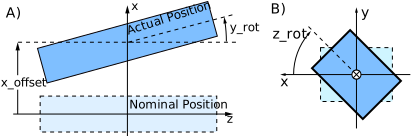
Fig. 10 Figures illustrating how alignment parameters affect the position of straight-line
elements. A) Effect of x_offset and y_rot, B) Effect of z_rot.#
For straight-line elements, that is for all elements where the curvilinear coordinate system
through the element is a straight line,
positioning is measured using a with respect to the center of the element.
This is illustrated in figure Fig. 10. Fig. 10A shows the
effect of x_offset and y_rot parameters. Fig. 10B shows the effect of z_rot.
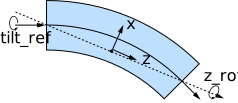
Fig. 11 For a bend element, the coordinate system used for positioning has origin at the center of the
bend chord with the z-axis along the chord. Shown is the situation where, with tilt_ref zero,
the plane of the bend is the \(x-z\) plane.#
For a bend element, the coordinate system used for positioning has origin at the center of the
bend chord with the z-axis along the chord as shown in Fig. 11. If the
tilt_ref parameter (which does not shift the element with respect to the branch
coordinate system but rather shifts the branch coordinate system itself) is zero, the plane
of the bend corresponds to the x-z plane.
Note: Using the center of the arc for the origin of the alignment coordinate system is also a
possible logical choice. The center of the chord was chosen for the center for a practical reason:
A very common misalignment for bends is a rotation of the bend along the chord axis. That is,
with the present choice, a pure z_rot misalignment. If the center of the arc were chosen,
such a misalignment would need offsets added to keep the bend end points invariant.
ConverterP: converter Element Parameters#
The ConverterP parameter group contains parameters for describing Converter elements.
The components of this group are:
ConverterP:
  species_out:      # [species] Species produced.
  E_tot_ref_out     # [eV] Output (downstream) reference energy
The species_out parameter gives the species produced. This will be the reference species
of the element downstream to the Converter.
In Construction…
ElectricMultipoleP: Electric Multipole Parameters#
The ElectricMultipoleP parameter group describes electric multipoles associated with the lattice
element. For a multipole of order N, the electric field \((E_x, E_y)\)
at a point \(\bf r\) in terms of the points polar coordinates \((r, \theta)\) is
where \(T\) is the “tilt” of the Nth multipole and \(E_n\) and \(E_s\) are
the normal and skew components of the field. N is defined such that
\(N = 0\) describes a dipolar multipole, \(N = 1\) describes a quadrupolar multipole, etc.
The three parameters, \(T\), \(E_n\) and \(E_s\) are not independent and only two are needed to specify a multipole. However, it is sometimes convenient to use all three. For example, \(E_n\) and \(E_s\) with \(N=0\) can be used to describe an element with independent horizontal and vertical steerings while \(T\) can be used to represent rotational errors.
The components of ElectricMultipoleP for specifying a multipolar field of order N is:
  tiltN: 0                  # [Radians] Tilt
  EnN: 0                    # [V/m^(N+1)] Normal component
  EsN: 0                    # [V/m^(N+1)] Skew component
  EnNL: 0                   # [V/m^N] Length integrated normal component
  EsNL: 0                   # [V/m^N] Length integrated skew component
The field and normalized values can be given in terms of the integrated strength.
Integrated values are specified with the letter
L appended at the end of the name. Example:
emp1:
  kind: Bend
  length = 0.86
  ElectricMultipoleP:
    tilt7: 0.7        # Tilt in raidians of 7th order multiple
    En3: 27.3         # Normal multipole component of order 3 in V/m^4
    En2L: 3.47e1      # Length integrated normal multipole component of order 2 in V/m^2
    geometry: vertically_pure   # See below
The length integrated values are related to the non-integrated values via
(EnL, EsL) = length * (En, Es)
where length is the length of the element.
For a given element, when specifying a multipole of a given order, the two strength components must be of the same type. That is, it is not permitted for one component to be length integrated and the other not, However, the multipole components of different order do not have to be of the same type.
With a bend element, the reference line about which the multipoles are referenced to
may be curved. This is set by the ref_coords parameter of the BendP
parameter group. If ref_coords is set to arc, the multipole_type parameter of
BendP will set how the multipoles are evaluated. See the BendP documentation for more details.
FloorP: Floor Parameters#
The FloorP parameter group holds parameters that describe the position and orientation
(collectively called “placement”) of some
coordinate system in global coordinates. When this group is contained in an element,
the coordinate system described is the branch coordinate system whose origin point is at the
upstream edge of the element.
The components of this group are:
FloorP:
  x: null                       # [m] Global x-coordinate.
  y: null                       # [m] Global y-coordinate.
  z: null                       # [m] Global z-coordinate.
  theta: null                   # [radians] Orientation angle.
  phi: null                     # [radians] Orientation angle.
  psi: null                     # [radians] Orientation angle.
  user_set: false               # [logic] Is placement set by the user or computed?
When this group is contained in an element, the placement can either be set by the creator
of the lattice is user_set is set to true or can be computed based upon the placement
of the upstream lattice elements of the branch the element is in.
FloorShiftP: FloorShift Parameters#
The FloorShiftP parameter group describes the shift the reference curve of a FloorShift element.
The components of FloorShiftP are:
  x_offset
  y_offset
  z_offset
  t_offset

  x_rot
  y_rot
  z_rot
Example:
FloorShiftP:
  x_offset:  0.34
  z_offset: 1.7
  z_rot: 0.23
FoilP: Foil Element Parameters#
The FoilP parameter group contains parameters for describing foil elements.
The components of this group are:
FoilP:
  dE_ref      # [eV] Reference energy change.
The reference energy at the downstream end of the Foil element will be E_tot_ref + dE_ref
where E_tot_ref is the upstream reference energy.
In Construction…
ForkP: Fork Parameters#
The ForkP parameter group holds parameters for a Fork element to describe what element
the Fork element is connected to.
The components of the ForkP group are:
ForkP:
  to_line                    # [string] Required. Name of branch or beam line to fork to.
  destination_element        # [string] Destination element to fork to. Default is the beginning element.
  direction: FORWARDS        # [enum] Longitudinal Direction of travel of injected beam.
  new_branch: null           # [string] Name to give newly created destination branch.
  propagate_reference: true  # [logical] Propagate reference species and energy.
The branch containing a forking element is called the
“source” branch. The branch that the forking element points to is called the
“destination” branch. It is possible for these two branches to be one and the same.
The element in the destination branch that the Fork connects to is called the “destination” element.
The to_line parameter is required and names the branch or beam line to fork to.
If new_branch is present and not null, a new branch is created in the lattice
set of branches with
the name given by new_branch and the Fork element will point to this new branch.
If new_branch is not present or is null, the destination element, specified by the
destination_element parameter, will be in an existing branch.
The optional destination_element component of ForkP gives the name of the destination element.
If not present, the default is the Beginning element.
The name given by destination_element must be unique.
The destination element may inherit the reference species and energy of the Fork element
if and only if the destination element is the Beginning element and
the propagate_reference component is set to true. If the destination element is not
the beginning element, propagate_reference is ignored and no reference parameters are
propagated.
The possible values of the optional direction switch are:
FORWARDS            # Injected particle propagates in the forward (+s) direction. Default.
BACKWARDS           # Injected particle propagates in the backward (-s) direction.
The direction component of ForkP indicates the direction that a particle moving into
the forked-to branch will travel. If direction is set to FORWARDS (the default)
the direction of travel is downstream (+s-direction) and vice versa if direction is set to
BACKWARDS. Note: It does not make sense to have direction set to BACKWARDS if the
destination element is the Beginning element. Similarly, it does not make sense to have direction
set to FORWARDS if the destination element is the end element in the branch.
Example Fork element:
- to_dump:
    kind: Fork
    ForkP:
      to_line: dump_beamline
      destination_element: dump_beginning
      new_branch: proton_dump
      propagate_reference: true
In this example, a Fork element connects to a new branch that will be instantiated using
a BeamLine called dump_beamline. In the expanded lattice, the destination branch will be called
proton_dump. The reference properties at the dump_beginning element that is forked to,
assuming this is the BeginningEle element at the beginning of the branch, will be
the reference properties at the Fork element.
GirderP: Girder Parameters#
In Construction…
MagneticMultipoleP: Magnetic Multipole Parameters#
The MagneticMultipoleP parameter group describes magnetic multipoles associated with the lattice
element. For a multipole of order N, the magnetic field \((B_x, B_y)\)
at a point \(\bf r\) in terms of the points polar coordinates \((r, \theta)\) is
where \(T\) is the “tilt” of the Nth multipole and \(B_n\) and \(B_s\) are
the normal and skew components of the field. N is defined such that
\(N = 0\) describes a dipolar multipole, \(N = 1\) describes a quadrupolar multipole, etc.
The three parameters, \(T\), \(B_n\) and \(B_s\) are not independent and only two are needed to specify a multipole. However, it is sometimes convenient to use all three. For example, \(B_n\) and \(B_s\) with \(N=0\) can be used to describe an element with independent horizontal and vertical steerings while \(T\) can be used to represent rotational errors.
The components of MagneticMultipoleP for specifying a multipolar field of order N is:
tiltN     # Tilt
BnN       # Normal component
BsN       # Skew component
Alternatively, the field components can be specified using normalized values
KnN       # Normalized normal component
KsN       # Normalized skew component
where the conversion between field and normalized components is:
with \(q\) being the charge of the reference particle and \(P_0\) being the reference momentum.
Furthermore, the field and normalized values can be given in terms of the integrated strength.
Integrated values are specified with the letter
L appended at the end of the name. Example:
MagneticMultipoleP:
  tilt7: 0.7        # Tilt of 7th order multipole
  Bn3: 27.3         # Normal multipole component of order 3.
  Bn2L: 3.47e1      # length integrated normal multipole component of order 2.
The length integrated values are related to the non-integrated values via
(BnL, BsL, KnL, KsL) = length * (Bn, Bs, Kn, Ks)
where length is the length of the element.
For a given element, when specifying a multipole of a given order, the two strength components must be of the same type. That is, it is not permitted for one component to be length integrated and the other not, as well as it is not permitted for one component to be a field and the other component to be normalized. However, the multipole components of different order do not have to be of the same type.
With a bend element, the reference line about which the multipoles are referenced to
may be curved. This is set by the ref_coords parameter of the BendP
parameter group. If ref_coords is set to arc, the multipole_type parameter of
BendP will set how the multipoles are evaluated. See the BendP documentation for more details.
“Tapering parameters” account for the fact that, due to synchrotron radiation, the energy of a beam at a particular point can be different from the reference value. There is an associated tapering parameter for all of the field parameters:
Parameter       Associated Tapering Parameter
  BnN             BnN_taper
  BsN             BsN_taper
  KnN             KnN_taper
  KsN             KsN_taper
Additionally, there are four length integrated tapering parameters corresponding to the four length integrated field parameters. The actual (total) field is the sum of the field plus the tapering field. For example:
Bs2 (actual) = Bs2 + Bs2_taper
MetaP: Metadata Parameters#
MetaP has four standard components
MetaP:
  alias: ""         # [string] An alternate name for the element.
  ID: ""            # [string] An identification string.
  label: ""         # [string] A label string
  description: ""   # [string] A descriptive string
In addition to an element’s name, these four strings can be used for pattern matching
when trying to locate all elements of a given type.
Besides the four standard strings, the MetaP parameter group can be used to store metadata
that describes the lattice element but is not part of the PALS standard.
Such data is necessarily program dependent.
Example metadata could be blueprint information, information on power supply connections, etc.
Components of MetaP are not limited to being simple strings or numbers but can be complex
structures. The information contained in MetaP should be restricted to information that
does not affect simulations. Custom, program specific information should be stored elsewhere.
Example:
quad1:                  # [string] user-defined name
  kind: Quadrupole      # [string] element switch
  MetaP:
    ID: 0137-85
    history:            # Custom information
      - manufacture: 2017-03-07
      - installed: 2018-01-23
      - ...
ParticleP: Particle Coordinates Parameters#
The ParticleP parameter group contains parameters for describing single particle coordinates
or a beam particle distribution that is Gaussian distributed.
The components of this group are:
ParticleP:                    # <> denotes average over distribution
  x:             0            # <x>  x  phase space component
  px:            0            # <px> px phase space component
  y:             0            # <y>  y  phase space component
  py:            0            # <py> py phase space component
  z:             0            # <z>  z  phase space component
  pz:            0            # <pz> pz phase space component
  spin_x         0            # <Sx> Spin x-component
  spin_y         0            # <Sy> Spin y-component
  spin_z         0            # <Sz> Spin z-component
  sigma_xx:      null         # <x^2>
  sigma_xpx:     null         # <x*px>
  sigma_xy:      null         # <x*y>
  sigma_xpy:     null         # <x*py>
  sigma_xz:      null         # <x*z>
  sigma_xpz:     null         # <x*pz>
  sigma_pxpx:    null         # <px^2>
  sigma_pxy:     null         # <px*y>
  sigma_pxpy:    null         # <px*py>
  sigma_pxz:     null         # <px*z>
  sigma_pxpz:    null         # <px*pz>
  sigma_yy:      null         # <y^2>
  sigma_ypy:     null         # <y*py>
  sigma_yz:      null         # <y*z>
  sigma_ypz:     null         # <y*pz>
  sigma_pypy:    null         # <py^2>
  sigma_pyz:     null         # <py*z>
  sigma_pypz:    null         # <py*pz>
  sigma_zz:      null         # <z^2>
  sigma_zpz:     null         # <z*pz>
  sigma_pzpz:    null         # <pz^2>
When describing a single particle, the sigma parameters are not relevant.
PatchP: Patch Parameters#
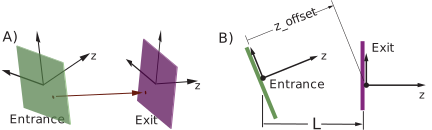
Fig. 12 A) A Patch element can align its exit face arbitrarily with respect to its entrance face. The
red arrow illustrates a possible particle trajectory form entrance face to exit face. B) The
reference length of a Patch element, if ref_coords is set to the default value of
EXIT_END, is the longitudinal distance from the entrance origin to the exit origin using the
reference coordinates at the exit end as shown. If ref_coords is set to ENTRANCE_END, the
length of the patch will be equal to the z_offset.#
The PatchP parameter group describes the shift the reference curve of a Patch or element.
Also see ReferenceChangeP for the parameter group that can be used
to change reference time and/or energy.
The components of PatchP are:
PatchP:
  x_offset          # [m] Offset in x-direction.
  y_offset          # [m] Offset in y-direction.
  z_offset          # [m] Offset in z-direction.
  x_rot             # [rad] Rotation around x-axis.
  y_rot             # [rad] Rotation around y-axis.
  z_rot             # [rad] Rotation around z-axis.
  flexible          # [logical] Default is False.
                    #    true -> User sets offsets and rot.
                    #    False -> Offsets and rot from branch layout.
  ref_coords        # [enum] Coordinate system defining the length
  user_sets_length  # [logic] Default is False. Is the element length User set?
The transformation from Patch entrance coordinates to exit coordinates is given by (5)
with
A straight line element like a Drift or a Quadrupole has the exit face parallel to the
entrance face. With a Patch element, the entrance and exit faces can be arbitrarily oriented
with respect to one another as shown in Fig. 12A.
There are two different ways the orientation of the exit face is determined. Which way is used is
determined by the setting of the flexible attribute. With the flexible attribute set to
False, the default, the exit face of the Patch will be determined from the offset, and rot
parameters. This type of Patch is called
“rigid” or “inflexible” since the geometry of the Patch is solely determined by the
Patch’s attributes as set in the lattice file and is independent of everything else. Example:
- pt
    kind: Patch
    PatchP:
      z_offset: 3.2
Note: A Patch element with only a z_offset, like in the example, is equivalent to a drift
with the same length as the z_offset value.
With flexible set to true, the exit face is taken to be the reference frame of the
entrance face of the next element in the lattice. In this case, it must be possible to compute the
reference coordinates of the next element before the reference coordinates of the Patch are
computed. A flexible Patch will have its offsets, pitches, and tilt as dependent
parameters and these parameters will be computed appropriately. Here the
Patch is called “flexible” since the geometry of the patch will depend upon the geometry of
the rest of the lattice and, therefore, if the geometry of the rest of the lattice is modified (is
“flexed”), the geometry of the Patch will vary as well.
The coordinates of the lattice element downstream of a flexible Patch can be computed
if there is a Fiducial element somewhere downstream or if there is a
multipass_slave element which is just downstream of the Patch or at
most separated by zero length elements from the Patch. In this latter case, the
multipass_slave must represent an \(N^{th}\) pass slave with \(N\) greater than 1. This works since
the first pass slave will be upstream of the Patch and so the first pass slave will have its
coordinates already computed and the position of the downstream slave will be taken to be the same
as the first pass slave. Notice that, without the Patch, the position of multipass slave
elements are independent of each other.
By default, there are no fields in the region of a Patch so A particle, starting at the upstream face of the
Patch, is propagated in a straight line to the downstream face. At the downstream end, a suitable coordinate
transformation must be made to translate the particle’s coordinates from the upstream coordinate frame to
the downstream coordinate frame. In this case, the Patch element can be
thought of as a generalized drift element.
A Patch element can have an associated electric or magnetic field.
A typical case, for example, is if a patch is used at the end of an injection line to match the reference
coordinates of the injection line to the line being injected into and the patch
element is within the field generated by an element in the line being injected into. In such a case,
it can be convenient to set what the reference coordinates are since the orientation of any fields
that are defined for a patch element will be oriented with respect to the patch element’s reference
coordinates. For this, the ref_coords
parameter of a patch can be used. Possible settings are:
ref_coords are:
ENTRANCE_END  #
EXIT_END      # Default
The default setting of ref_coords is EXIT_END and with this the reference coordinates are
set by the exit end coordinate system (see Fig. 12). If ref_coords is set to
ENTRANCE_END, the reference coordinates are set by the entrance end coordinate system.
Unfortunately, there is no intuitive way to define the “length” of a patch. This is
important since the reference transit time is the element length divided by the
reference velocity. If the parameter user_sets_length is set to true, the
value of length set in the lattice file will be used (default is zero). user_sets_length is set
to False (the default), the length of a patch is calculated depending upon the setting of
ref_coords. If ref_coords is set to EXIT_END, the length of the patch is calculated
as the perpendicular distance between the origin of the patch’s entrance coordinate system and the
exit face of the patch as shown in Fig. 12B. If ref_coords is set to ENTRANCE_END,
the length is calculated as the perpendicular distance between the entrance face and the origin of
the exit coordinate system. In this case, the length will be equal to z_offset.
Note: To shift the reference energy, time, or species, use the
ReferenceChangeP parameter group.
The extra_dtime_ref of the ReferenceChageP group can be used to set
the change in reference time through a patch. The difference between using extra_dtime_ref and
length is that the reference time change using extra_dtime_ref is independent of the reference
velocity while with length there is a dependence upon the reference velocity.
ReferenceP: Reference Parameters#
The ReferenceP parameter group contains parameters for describing the reference energy,
species, and time at the upstream end of the element.
The components of this group and their defaults are:
ReferenceP:
  species_ref: ""   # [string] Reference species
  pc_ref: 0         # [momentum*c] Reference momentum times speed of light
  E_tot_ref: 0      # [eV] Reference total energy
  time_ref: 0       # [s] Reference time
Except for time_ref, the reference parameters are generally the same at the
upstream and downstream ends of the element. However, there are exceptions.
For example, the upstream and downstream species_ref for a Foil element
will generally be different. And the reference energy will change if the element has a
dE_ref as in an RFCavity element.
For a BeginningEle element, parameters of this group are user settable.
For all other element kinds, the parameters of this
group are calculated (output parameters) and are not user settable.
The reference parameters at the upstream end of any non-BeginningEle element will be the
same as the reference parameters at the downstream end of the previous element.
To adjust reference parameters at any point in a lattice branch, use the ReferenceChange element.
The downstream reference time is calculated via
time_ref(downstream) = time_ref(upstream) + transit_time
where transit_time is the time to transit the element assuming a straight line trajectory
and a linear energy change throughout the element. The formula
for the transit time is
transit_time = length * (E_tot_ref(upstream) + E_tot_ref(downstream)) /
                            (c * (pc_ref(upstream) + pc_ref(downstream)))
where length is the length of the element and c is the speed of light.
For elements where there is no energy
change (no associated dE_ref element parameter), the transit time calculation simplifies to
transit_time = length / (beta_ref * c)
where beta_ref is the normalized particle reference velocity.
ReferenceChangeP: Adjustment of Reference Parameters#
The ReferenceChangeP parameter group can be used to adjust reference parameters.
For example, it is often convenient to adjust the reference time after a Wiggler
element to account for the extra transit time due to particle oscillations.
The components of this group are:
ReferenceChangeP:
  dtime_ref: null      # [sec] Reference time adjustment
  dE_ref: null         # [eV] Reference energy adjustment.
  dpc_ref: null        # [eV] Reference momentum adjustment.
  time_ref: null       # [eV] Set reference time.
  E_tot_ref: null      # [eV] Set reference energy.
  pc_ref: null         # [eV] Set reference momentum.
  species_ref: null    # [species] Set reference species.
Adjustments are only made if there are non-null parameters. Only one of dE_ref,
dpc_ref, E_tot_ref, and pc_ref may be present.
Similarly, only one of dtime_ref and time_ref may be present.
The extra_dtime_ref parameter in the above is ment as a correction to take into account
for particle motion that is not straight or acceleration that is not linear in energy. For example,
in a wiggler, extra_dtime_ref can be used to correct for the oscillatory nature of the
particle trajectories.
Since the PALS standard does not define how tracking is to be done, extra_dtime_ref and dE_ref
must be calculated by the User.
RFP: RF Parameters#
The components of this group and their defaults are:
RFP:
  frequency: 0                  # [Hz] RF frequency
  harmon: 0                     # [unitless] RF frequency harmonic number
  voltage: 0                    # [V] RF voltage
  gradient: 0                   # [V/m] RF gradient
  phase: 0                      # [rad/2pi] RF phase in 0 to 2*pi
  multipass_phase: 0            # [rad/2pi] RF Phase added to multipass elements
  cavity_type: STANDING_WAVE    # [enum] Cavity type
  num_cells: null               # [-] Number of cavity cells
  zero_phase: ACCELERATING      # [enum] Sets what phase = 0 means.
  L_active: L                   # [m] Active acceleration length.
  dE_ref: 0                     # [eV] Change in reference energy.
Either frequency or harmon should be set but not both. The
relationship between the two is frequency = harmon / t1_ref where
t1_ref is the 1-turn reference time.
The L_active length is the longitudinal length over which there is an RF field. The active
length can be different from the element length L since L can include the entire RF vessel.
Especially with cryo-modules, L_active can be quite different from L.
If not given, the value of L_active defaults to the value of L.
Either voltage or gradient should be set but not both. The two are related by the active length
voltage = gradient * L_active.
The cavity_type parameters sets the kind of cavity under consideration. Possible settings are:
STANDING_WAVE             # Default
TRAVELING_WAVE
The zero_phase parameter sets what zero phase is in reference to. Possible settings are:
ACCELERATING              # Default. Zero phase is the maximum accelerating phase.
BELOW_TRANSITION          # Zero phase is at the stable zero crossing for particles below transition.
ABOVE_TRANSITION          # Zero phase is at the stable zero crossing for particles above transition.
The RF phase phase_RF, in units of rad/2pi, at time t will be
phase_RF = t*frequency + phase + phi0
where phi0 is a phase determined by the setting of zero_phase.
The reference energy at the downstream end of the RF element will be E_tot_ref + dE_ref
where E_tot_ref is the upstream reference energy.
SolenoidP: Solenoid Parameters#
The SolenoidP parameter group describes a magnetic solenoid.
The components of SolenoidP are:
SolenoidP:
  Ksol      # Normalized solenoid strength.
  Bsol      # Solenoid field.
The conversion between the field and normalized components is
with \(q\) being the charge of the reference particle and \(P_0\) being the reference momentum.
TaylorP: Taylor Map Parameters#
The TaylorP group stores a Taylor transport map. This includes both orbital phase space
and spin components of the particle.
The components of TaylorP are:
TaylorP:
  x_out:      # [Struct] Taylor series for output x orbital component.
  px_out:     # [Struct] Taylor series for output px orbital component.
  y_out:      # [Struct] Taylor series for output y orbital component.
  py_out:     # [Struct] Taylor series for output py orbital component.
  z_out:      # [Struct] Taylor series for output z orbital component.
  pz_out:     # [Struct] Taylor series for output pz orbital component.
  S_q1_out:   # [Struct] Taylor series for output spin q1 quaternion component.
  S_qx_out:   # [Struct] Taylor series for output spin qx quaternion component.
  S_qy_out:   # [Struct] Taylor series for output spin qy quaternion component.
  S_qz_out:   # [Struct] Taylor series for output spin qz quaternion component.
  ref_in:     # [Struct] Input orbital reference point for the map.
Here “input” refers to the starting coordinates at the beginning of the element,
and “output” referes to the ending coordinates at the end of the element.
The particular definition of the orbital components is given by the
phase_space_coordinates node. The spin rotation map is represented
using quaternions.
Each Taylor series structure has a set of monomial term nodes with the syntax:
term <coef> <e1> <e2> <e3> <e4> <e5> <e6>
Each term specifies a real valued coefficient <coef> and six integer exponents
<e1> through <e6>. The monomial represented by a term is:
Example:
T9:               # Taylor element
  kind: Taylor
  TaylorP:
    x_out:
      term 3.4 1 0 0 2 0 1
      term ...
    y_out:
      ...
The term term 3.4 1 0 0 2 0 1 represents the monomial \(3.4 \cdot x \cdot p_y^2 \cdot p_z\)
for the Taylor series for the output value of the orbital \(x\) component.
Note that the spin transport is independent of the input spin coordinates.
In other words, Stern-Gerlach effects are ignored.
The ref_in component of TaylorP gives the orbital reference point about which the
taylor map is constructed. The components of ref_in are:
x:      # x orbital component
px:     # px orbital component
y:      # y orbital component
py:     # py orbital component
z:      # z orbital component
pz:     # pz orbital component
Example:
TaylorP:
  ref_in:
    x: 0.034
    px: 0.02
    ...
TrackingP: Parameters Pertaining to Tracking.#
Tracking parameters are highly program specific but it is useful to have a dedicated group so that such program specific parameters can be clearly identified.
Example:
TrackingP:
  SciBmad:
    ds_step: 0.3
    tracking_method: scibmad_standard
    ...
The above set parameters specific to the SciBmad simulation ecosystem.
TwissP: Initial Twiss, coupling, and dispersion Parameters.#
Typically this parameter group is used to specify the initial Twiss, coupling and dispersion
parameters at the beginning of a lattice branch.
The components if TwissP are:
alpha_a       # [-] "a" mode alpha
alpha_b       # [-] "b" mode alpha
beta_a        # [m] "a" mode beta
beta_b        # [m] "b" mode beta
cmat11        # [-] c[1,1] coupling matrix component.
cmat12        # [m] c[1,2] coupling matrix component.
cmat21        # [1/m] c[2,1] coupling matrix component.
cmat22        # [-] c[2,2] coupling matrix component.
eta_x         # [m] x-axis dispersion
eta_y         # [m] y-axis dispersion
etap_x        # [-] x-axis momentum dispersion.
etap_y        # [-] y-axis momentum dispersion.
deta_x_ds     # [-] x-axis dispersion derivative.
deta_y_ds     # [-] y-axis dispersion derivative.
phi_a         # [rad] "a" mode phase.
phi_b         # [rad] "b" mode phase.
Discussion of the normal mode decomposition is found in Sagan and Rubin [1]. Dispersion parameters are documented in the Dispersion section.